A widget shows market data without opening an app. On iPhone it can sit on the home screen, and some apps add one for the lock screen. What differs is the content: price quotes, a heat map of an index, the next earnings dates or a single mood reading.
Two things decide which one suits you. The first is what you want to see at a glance: one number, a list of quotes or a map. The second is the place: the home screen has room for a map, while the lock screen fits a single figure. A widget is mentioned here only where the app's own store page or fact sheet names one.
Four entries cover stocks. The last is a crypto mood widget.
-
Sentiscale
Vesper AI
Suits: Investors who want the market's mood on the lock screen
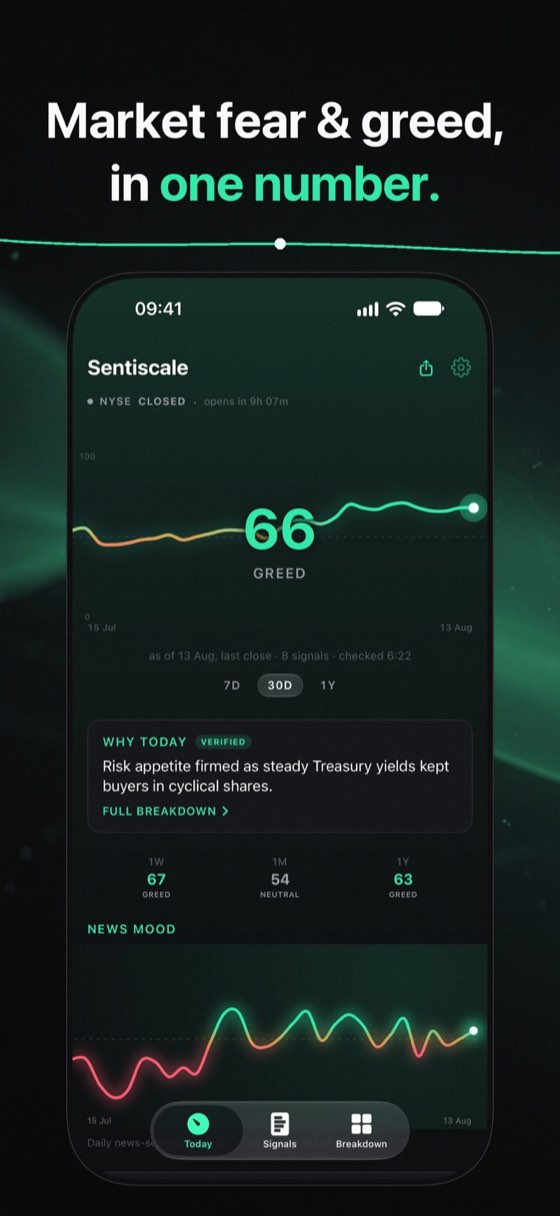
Sentiscale's widgets show a mood reading instead of a row of prices: the stock market's fear and greed number on a scale from 0 to 100. On iPhone the gauge can sit on the lock screen, and a home-screen widget shows stocks and crypto side by side. The Android version has a home-screen widget, and there is an Apple Watch app as well.
The reading behind the widget covers the US, Europe and Asia and refreshes every 30 minutes. Each region blends eight signals. The US mix runs from news and momentum to junk bonds and tail risk. Because the bands have names, a glance is enough: 0 to 24 is extreme fear and 76 to 100 is extreme greed.
The widget belongs to the free tier, together with the three regional gauges and the alerts for extreme readings. Pro adds a per-sector breakdown and a written reason for each day's move, citing its headlines. The app asks for no account and carries no ads.
- US, Europe and Asia
- Free gauge, widget and alerts
- No account, no ads
- Also on Apple Watch and Android
- Price
- Free, Pro from $3.99 a month
- Devices
- iPhone, iPad, Apple Watch
- Last update
- Oct 2026
-

Stock Map
Nazim Can Altinova
Suits: Investors who want a whole index as a heat map widget
Stock Map draws the S&P 500, Nasdaq 100 and Dow Jones as heat maps. Per its App Store listing, it offers Category, Favorites and Watchlist heat map widgets for the home screen, plus a Lock Screen icon widget on iOS 16 or later that opens the app. The listing gives a default widget refresh of 30 minutes; with Premium you choose between 10 and 60.
- Price
- Free
- Devices
- iPhone, iPad
- Last update
- Sep 2026
-
Stock Events
Stock Events GmbH
Suits: Investors who track earnings and dividend dates
Stock Events is a calendar first. Per its App Store listing, it gathers earnings, dividend dates and option expirations for the stocks you follow, plus upcoming IPOs and an economic calendar. The listing states that it has home screen widgets, and custom alerts for the stock and crypto price levels you are watching. Watchlists and portfolio tracking cover stocks, ETFs, options and crypto.
- Price
- Free
- Devices
- iPhone, iPad, Apple Watch
- Last update
- Nov 2026
-
Stocks (Apple)
Apple Inc.
Suits: iPhone owners who want plain price quotes at a glance
Stocks is Apple's own app. Per its App Store listing, you can add Stocks widgets to the Home Screen or the Lock Screen to see price quotes at a glance. Watchlists hold stocks, indexes, mutual funds, ETFs and currencies, with color-coded sparklines for each ticker. Through iCloud the same lists follow you to iPad, Mac, Apple Watch and Apple Vision Pro.
- Price
- Free
- Devices
- iPhone, iPad, Apple Watch
- Last update
- Oct 2026
-
Fear and Greed - Crypto
Mobiglance SRL
Suits: Crypto holders who want a live mood widget
Fear and Greed - Crypto is the one crypto entry here, for readers who hold coins as well as shares. The listing states that its home screen widget updates in real time and has a dark mode, like the app itself. The reading is the sentiment of the Bitcoin market on a meter from 0 to 100, and past values are stored for up to one year.
- Price
- Free
- Devices
- iPhone, iPad, Apple Watch
- Last update
- Sep 2022
Compare at a glance
| App | Price | Devices | Last update |
|---|---|---|---|
| Sentiscale | Free, Pro from $3.99 a month | iPhone, iPad, Apple Watch | Oct 2026 |
| Stock Map | Free | iPhone, iPad | Sep 2026 |
| Stock Events | Free | iPhone, iPad, Apple Watch | Nov 2026 |
| Stocks (Apple) | Free | iPhone, iPad, Apple Watch | Oct 2026 |
| Fear and Greed - Crypto | Free | iPhone, iPad, Apple Watch | Sep 2022 |
Source: US App Store listings, read on 17 Nov 2026. "Devices" lists the Apple devices each listing names.
How we picked
We read the store listings of stock and market apps and kept those that describe a widget in their own words. For each one we note where the widget can sit and what it shows, as far as the listing says. We did not install or run the widgets, and nothing here was lab-tested.
The order after the first entry is not a ranking of quality.
Home screen or lock screen
A home screen widget has more room, which suits a heat map or a list of quotes. A lock screen widget is small and works best for a single figure. If you want the market's mood on a locked phone, look for a lock screen option.
Questions and answers
Do these widgets update in real time?
It depends on the app. Fear and Greed - Crypto describes a widget that updates in real time. Stock Map lists a 30-minute refresh by default and notes that iOS decides the exact timing.
Which of these apps have a lock screen widget?
Sentiscale and Apple's Stocks, per their fact sheet and listing. Stock Map lists a Lock Screen icon widget that opens the app. Fear and Greed - Crypto's release notes mention lock-screen widgets for iOS 16.
Is a widget enough to follow the market?
A widget shows a snapshot. For news, charts or the reason behind a move, you still open the app.